
How to delete your Hiive account
You can delete your account from inside the app in four steps. No email required, no waiting on support.
Deletion is permanent. Your profile, activity history, connections, community memberships and event history go with it. We retain a limited amount of data where the law requires it, or for security, fraud prevention and dispute resolution — the Privacy Policy sets out exactly what and for how long.
- Step 01
Open your profile
Open Hiive and tap the profile tab in the navigation bar at the bottom of the screen.

- Step 02
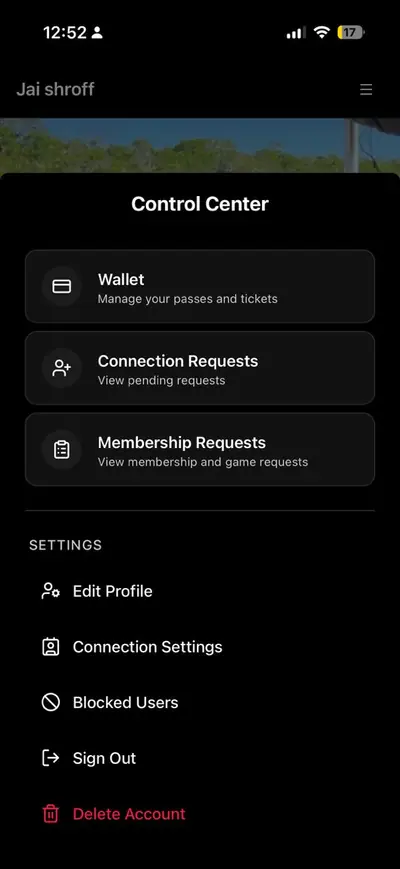
Open the menu, then Delete Profile
Tap the menu icon in the top-right corner of your profile, then choose Delete Profile from the list.
- Step 03
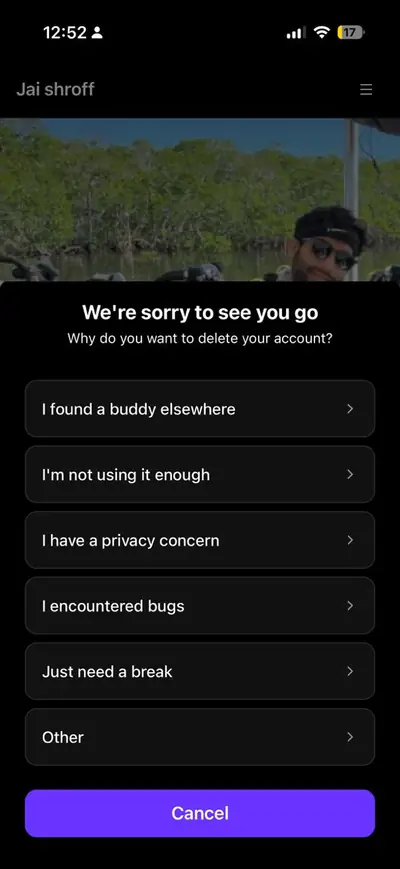
Pick a reason
Choose the reason you're leaving. It helps us understand what isn't working.
- Step 04
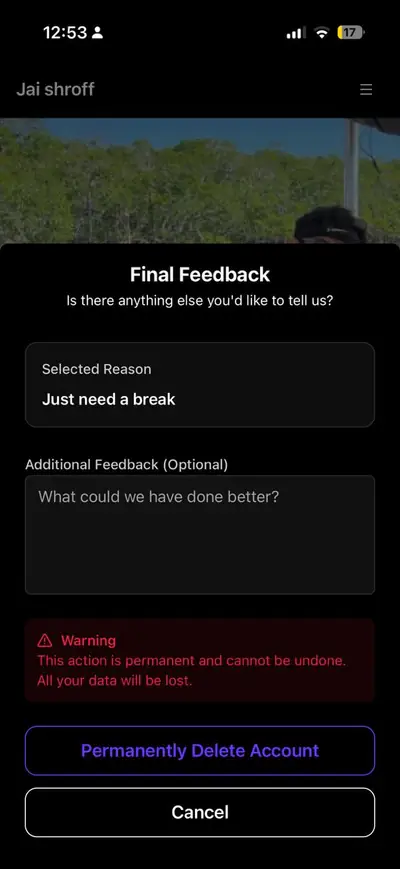
Confirm the deletion
Add any feedback you want to leave, then tap Delete Account to submit the request.
Stuck on any of this?
If you can’t get into your account, or the option isn’t where these steps say it is, email us and we’ll handle the deletion for you.